
SLAX Cheat Codes also known as SLAX Boot Options or additional boot parameters are optional startup arguments that control how SLAX boots, detects hardware, loads modules, and handles persistence. Some boot parameters are standard Linux kernel options, while others are SLAX specific. Using cheat codes allows you to troubleshoot hardware issues, control persistence, boot SLAX from alternative locations such as system RAM, skip login prompts, or optimize performance.
How and When to Use SLAX Cheat Codes
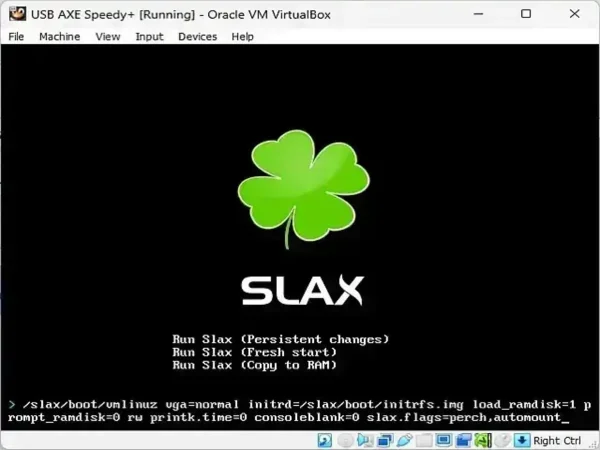
When booting SLAX, wait for the boot menu to appear. Select a boot entry and press the Tab key to edit the kernel command line. Cheat codes are appended to the end of the existing boot string, separated by spaces.
Additional SLAX boot parameters are useful when:
- SLAX fails to boot on specific hardware
- You need to disable problematic drivers
- You want to enable persistence or load optional modules
- You want SLAX to run fully from RAM (system memory)
- You need to boot SLAX from a hard drive or ISO file
Understanding SLAX Versions and Compatibility
SLAX has evolved significantly over time. Older releases (SLAX 6.x and early 7.x) relied heavily on Syslinux and legacy hardware options. Modern SLAX releases (SLAX 11.x and newer) use updated kernels and improved auto detection.
As a result:
- Many hardware disable options are now legacy and may have no effect on modern systems
- Persistence handling is primarily controlled via the
changes=parameter - Some older flags still work but are no longer recommended
This guide documents both legacy and modern cheat codes, clearly noting their purpose and relevance.
SLAX Cheat Codes | Boot Parameters and Functions
| SLAX Boot Parameter | SLAX Boot Option Function |
|---|---|
acpi=off |
Disables ACPI power management. Useful on very old or incompatible systems. |
nomodeset |
Disables kernel mode setting. Common fix for black screen or GPU driver issues. |
nodma |
Disables Direct Memory Access for storage devices. |
noapic |
Disables Advanced Programmable Interrupt Controller support. |
nohotplug |
Legacy option to disable hotplug hardware detection. Mostly obsolete. |
nopcmcia |
Disables PCMCIA support. Relevant only for very old laptops. |
noagp |
Disables AGP detection. Rarely needed on modern systems. |
nohd |
Prevents mounting internal hard drives. |
nocd |
Prevents mounting optical drives. |
nosound |
Disables sound initialization. |
from=/dev/sda1/slax.iso |
Boots SLAX from an ISO file located on a specific device. |
from=/path/to/slax/ |
Loads SLAX from an extracted directory instead of the boot device. |
changes=/dev/sda1changes=/dev/sda1/slax.dat |
Enables persistence by storing changes on a device or file. This is the primary persistence mechanism in modern SLAX. |
copy2ram |
Copies essential SLAX files to RAM, allowing removal of the boot media. |
toram |
Loads the entire SLAX system into RAM. Requires RAM equal to or larger than the ISO size. |
slax.flags=toram |
Alternative syntax for loading SLAX fully into RAM. |
load=module |
Loads optional modules from the /optional/ directory. |
noload=module |
Prevents specific modules from loading. |
debug |
Pauses boot and drops to a shell for debugging. Press Ctrl+D to continue. |
autoexec=command1;command2 |
Runs specified commands automatically during boot. Useful for auto starting X or scripts. |
passwd=ask |
Prompts for a root password at boot. Behavior may vary by SLAX version. |
Persistence in Modern SLAX
By default, SLAX runs entirely in memory and discards changes on reboot. To preserve changes, you must explicitly enable persistence using the changes= parameter.
Common persistence examples:
changes=/dev/sdb1
changes=/dev/sdb1/slax.dat
changes=/slax/changes/
Modern SLAX automatically detects and manages persistence locations when specified correctly.
Performance Optimization Cheat Codes
For best performance:
- Use
toramorcopy2ramon systems with sufficient memory - Use fast SSD based USB flash drives
- Disable unused hardware modules with
noload=
Troubleshooting Boot Issues
If SLAX fails to boot:
- Try
nomodesetfor graphics issues - Disable ACPI using
acpi=off - Boot with
debugto inspect errors - Verify ISO integrity
Frequently Asked Questions
Are SLAX cheat codes the same as kernel boot parameters?
Some are kernel parameters, others are SLAX specific. Both are passed through the same boot command line.
Do all cheat codes work on the latest SLAX?
No. Legacy hardware flags may be ignored on modern kernels. Persistence and RAM based options remain fully supported.
Is there a default root password in SLAX?
No. Modern SLAX typically boots without a root password unless one is explicitly set.
Can I combine multiple cheat codes?
Yes. Separate parameters with spaces when appending them at the boot prompt.
Final Thoughts
SLAX cheat codes remain a powerful way to control the boot process, troubleshoot hardware, and customize behavior. While some legacy options are no longer required on modern systems, persistence, RAM loading, and module control continue to be essential tools for portable SLAX bootable USB usage.
For the most up to date information, visit the official SLAX project website.
